What’s newFor teachers
How to offer a new time for a lesson that didn't take place
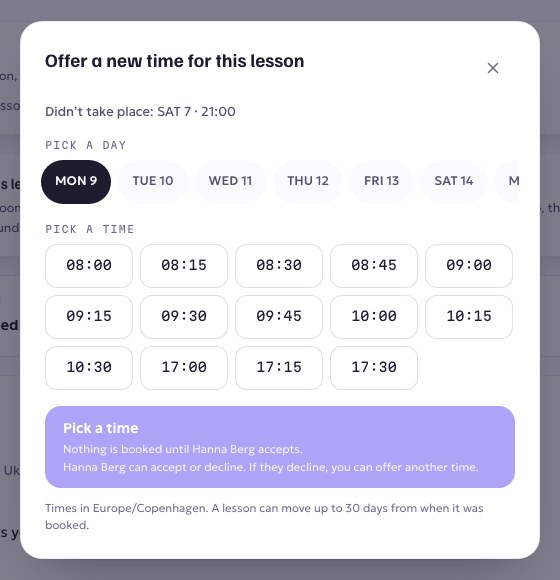
When nobody was seen in the lesson room, the lesson is put on hold: you are not paid for it yet and your student isn't refunded. You can give your student a new time for it yourself.
Step by step
- Go to Lessons and open the lesson that didn't take place.
- In the card Offer a new time for this lesson, choose Offer a new time.

- Pick a day, then a time. Only times that are open on your calendar are shown.
- Press Offer … to …. Your student is told straight away by email and notification.
What happens next
- Your student accepts: the lesson is booked again at the new time and appears in your calendar as an ordinary upcoming lesson. Nothing is charged or refunded, and you're paid once it's taught.
- Your student says no: you get a notification, and the lesson's page lets you offer another time.
- Nobody answers: the offer lapses after 72 hours. You can offer again.
While you wait, the lesson's page shows Waiting on your student. Keep that time free. You can take the offer back with Take it back.
Good to know
- You can offer a new time for up to 30 days after the lesson was due.
- A lesson that did take place but wasn't recorded properly isn't this case. Use We did have this lesson on the lesson's page instead.